

Response-Header (probe.php)
Lade …
Geladene Assets
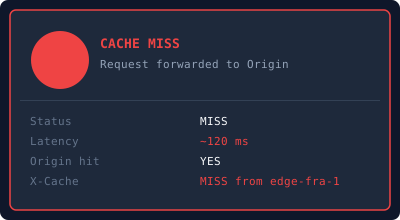
Cache Miss
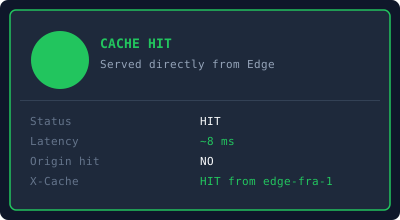
Cache Hit
📄
style.css
⚡
app.js
Resource Timing (Live via Performance API)
| Asset | Typ | Größe | Dauer | Cache |
|---|---|---|---|---|
| Lade … | ||||
Cache-Control konfigurieren
# .htaccess – im Root des Webspace ablegen (Plesk / Apache)
<IfModule mod_expires.c>
ExpiresActive On
ExpiresByType text/html "access plus 1 minute"
ExpiresByType text/css "access plus 1 day"
ExpiresByType application/javascript "access plus 1 day"
ExpiresByType image/svg+xml "access plus 30 days"
ExpiresByType image/png "access plus 30 days"
</IfModule>
<IfModule mod_headers.c>
# Statische Assets: Browser + CDN cachen lange
<FilesMatch "\.(css|js|svg|png|jpg|webp|ico)$">
Header set Cache-Control "public, max-age=86400, immutable"
</FilesMatch>
# HTML: kurz cachen
<FilesMatch "\.html?$">
Header set Cache-Control "public, max-age=60, stale-while-revalidate=30"
</FilesMatch>
# probe.php: CDN soll 30 s cachen (Demo)
<FilesMatch "^probe\.php$">
Header set Cache-Control "public, max-age=30, stale-while-revalidate=10"
Header set Access-Control-Allow-Origin "*"
Header set Access-Control-Expose-Headers "CF-Cache-Status, X-Cache, X-Bunny-Cache, Age"
</FilesMatch>
</IfModule>
# BunnyCDN Setup
# 1. Pull Zone anlegen: Dashboard → CDN → Add Pull Zone
# Origin URL = https://dein-plesk-domain.de/cdn_demo/
# 2. Edge Rules (Pull Zone → Edge Rules → Add Rule)
# Regel A: Statische Assets cachen
Match: URL Extension is one of svg, png, jpg, css, js
Actions:
→ Set Cache TTL: 86400 (1 Tag)
→ Override Origin Cache: Enabled
# Regel B: probe.php cachen (für die Live-Demo)
Match: URL Path contains probe.php
Actions:
→ Set Cache TTL: 30 (30 Sekunden)
→ Override Origin Cache: Enabled
# 3. Cache purgen nach Upload
curl -X POST \
"https://api.bunny.net/pullzone/{ZONE_ID}/purgeCache" \
-H "AccessKey: {API_KEY}"
# 4. Response-Header die BunnyCDN setzt:
X-Bunny-Cache: HIT ← gecacht am Edge
X-Bunny-Cache: MISS ← vom Origin geholt
Age: 15 ← Sekunden im Cache
# Cloudflare Setup
# 1. Domain in Cloudflare eintragen, Nameserver wechseln
# 2. Cache Rules: Dashboard → Caching → Cache Rules → Create Rule
# WICHTIG: Cloudflare cached .php nie — daher wird probe.php
# über /probe (ohne Erweiterung) aufgerufen (.htaccess Rewrite).
# Regel A: Statische Assets
If: URI Full matches regex .*\.(css|js|svg|png|jpg|webp)$
Then:
Eligible for Cache: Yes
Edge TTL: 1 day (ignore origin)
Browser TTL: 1 day
# Regel B: /probe – kein .php → Cloudflare cached es normal
If: URI Path equals /cdn_demo/probe
Then:
Eligible for Cache: Yes
Edge TTL: 30 seconds (ignore origin TTL)
# 3. Cache purgen
curl -X POST \
"https://api.cloudflare.com/client/v4/zones/{ZONE_ID}/purge_cache" \
-H "Authorization: Bearer {TOKEN}" \
-d '{"purge_everything":true}'
# 4. Response-Header die Cloudflare setzt:
CF-Cache-Status: HIT ← gecacht am Edge
CF-Cache-Status: MISS ← vom Origin geholt
CF-Cache-Status: EXPIRED ← Cache abgelaufen, neu geholt
CF-Cache-Status: BYPASS ← tritt bei .php auf (Grund für den Rewrite)
CF-Ray: abc123-FRA ← Edge-PoP Identifier
# nginx.conf (Referenz – Plesk nutzt primär Apache/.htaccess)
# Relevant wenn Plesk mit nginx als Reverse Proxy läuft
server {
listen 80;
server_name cdn-demo.example.com;
root /var/www/cdn_demo;
location ~* \.html$ {
add_header Cache-Control "public, max-age=60, stale-while-revalidate=30";
}
location ~* \.(css|js)$ {
add_header Cache-Control "public, max-age=86400, immutable";
}
location ~* \.(svg|png|jpg|webp|ico)$ {
add_header Cache-Control "public, max-age=2592000, immutable";
}
location = /probe.php {
add_header Cache-Control "public, max-age=30";
fastcgi_pass unix:/run/php/php-fpm.sock;
include fastcgi_params;
}
}